I have installed Filecloud on openmediavault and it is working really well. My problem is, I cannot figure out how to setup ssl and enable https on my server. Hoping someone can guide me through the process to set up and install and thus securing my server. I have searched online and there is little instruction regarding this.
Thanks.
Hello @Hcarson
Welcome to Filecloud Community edition.
Can you please try the below documentation link to install SSL
https://www.getfilecloud.com/supportdocs/display/cloud/Use+SSL+on+Linux
Please let us know if you find any issues
Thanks for the reply but this isn’t openmedia vault specific. I have some understanding of let’s encrypt but as far as to set it up for open media vault I’m not sure.
This is the info i got…
No LSB modules are available.
Distributor ID: Debian
Description: Debian GNU/Linux 9.12 (stretch)
Release: 9.12
Codename: stretch
I have filecloud installed in openmediavault in a docker container. Thanks
Thank you for the update.
As you have installed FileCloud in Docker container, you can follow the same link in the previous update to install SSL, choose the option ubuntu.
https://www.getfilecloud.com/supportdocs/display/cloud/Use+SSL+on+Linux
https://www.getfilecloud.com/supportdocs/display/cloud/Install+an+SSL+certificate+on+Ubuntu
Yes I have tried that but as omv is a Debian installation these commands won’t work.
Can you please share with us a small screen recording of the steps you are trying. Please make sure that it does not contain any of your sensitive contents.
ok so I have followed your steps and starting from the first command. I get “command not found” see screen 1. In the apache2 directory, the directory as stated in the instructions does not exist. See screen 2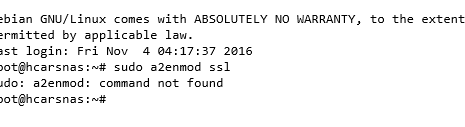
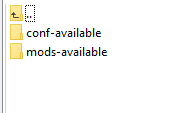
Openmediavault uses nginx what if instead of the apache 2 folder I use etc/ngnix instead? As I am new to this Openmediavault, I’m not sure how to config the https. But I do know it uses nginx and if you can help get my filecloud using https it would certainly be a good day then. Thanks
Hello @Hcarson
We have checked with our team, and unfortunately, we don’t support this distro Openmediavault. So we are not able to help you with this problem. Can you please try with one of our supported distros. We recommend this because, in the future, you may run into other distro-specific issues with your installation.
OK. What would you suggest. Ubuntu? Where would I find this version to download and will my year license still be valid. Thanks so much for your help.
Hi @Hcarson
Thank you for the update.
You can use Windows 2012, 2016, Ubuntu 16.04, 18.04, Centos 7. Please refer the below documentation for more details regarding the installation.
https://www.getfilecloud.com/supportdocs/display/cloud/Installation+on+Linux+Distros
https://www.getfilecloud.com/supportdocs/display/cloud/Installation+on+Windows
https://www.getfilecloud.com/supportdocs/display/cloud/Installation
The license will be valid for use.
Please get back to us if you need any assistance.