Hi
I used filesync software to sync my laptop data with filecloud. during this i think 1 folder was deleted (65109032778a7372726573).
Now weh i go to settings and storage and i do Check Path, i get msg “Storage system already initialized, however file containers are missing!”
how do create container again. I am using windows 2016
sanjay
hi @sanjshah68
was there any changes made to or moved the FileCloud Managed storage path?
It appears the folders inside the managed storage path is missing, probably moved or deleted. Can you please share a screenshot of the contents of Admin Portal > Settings > Storage > My files > Storage path location and the first sub folder inside it?
Also, please share the output of the below commands.
To connect to the Mongo Shell:
C:\xampp\mongodb\bin\mongo.exe
Inside the Mongo Shell:
use tonidostoragedb
db.containers.find().pretty()
Hi
Another software deleted a sub folder inside the path specified in the storage.
file attached for your refence.
regards
sanjay
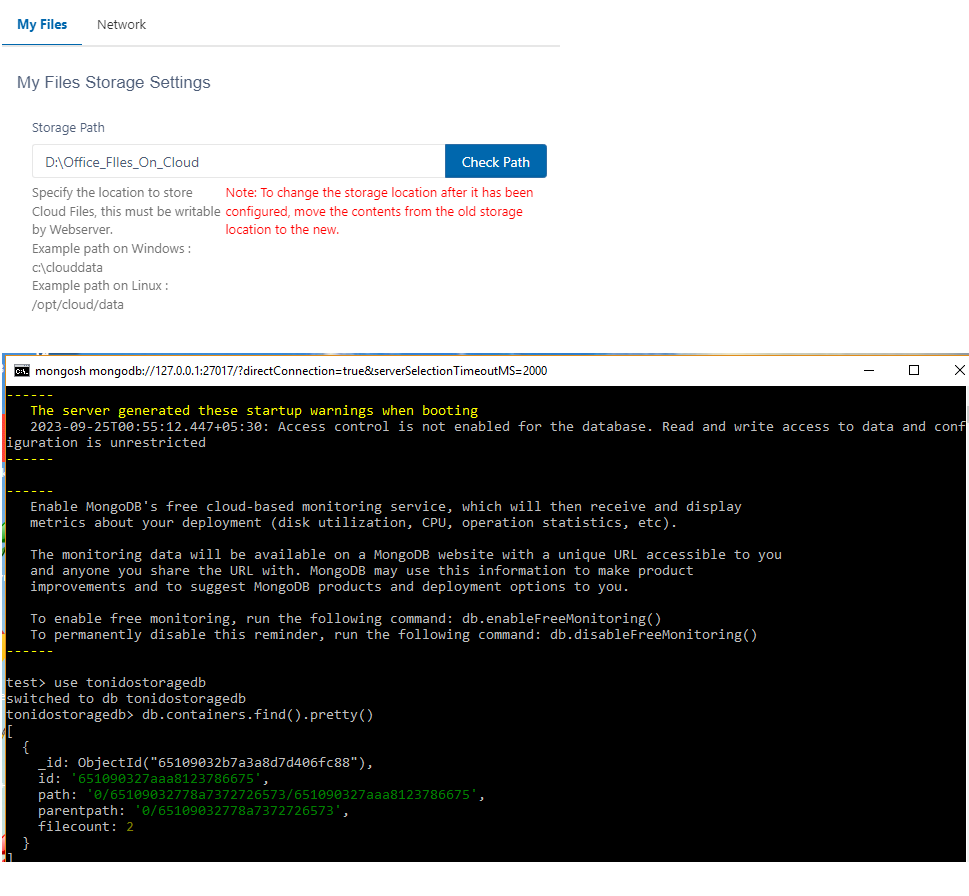
It looks like the container folder is missing from the storage location
Could you please confirm if your users are not using the Managed Storage (My Files or Team Folder)?
To solve this error, please create the same folder structure in that storage path D:\Office_Files_On_Cloud
Main Folder - 65109032778a7372726573
Sub Folder - 651090327aaa8123786675
Hello
We have created Team folder. But nobody is using it.
Can I create folders as you suggested
Regards
Sanjay
Hello,
Now i am not getting any msg.
By default, Team Folders and containers are always created in the path specified in the storage ? i want to keep them separate so containers are not deleted accidently
sanjay
Hi
Yes kindly try to follow the suggestions provided in the previous response
If you find any difficulty kindly let us know we are here to help you out
if you can answer my previous question
regards
sanjay
Hi Sanjay
Kindly know that the user My Files and Team Folder data are stored under same storage path unfortunately it is not possible to separate them
Hi
Sorry for the confusion.
My question is My Teams folder and container folder are in the same folder which is specified in Setup/Storage. Is there any way I can save them in different folders. Eg 1 folder will have only container folders and other folder will have Teams folders.
Also what is the purpose of container folders.
Regards
Sanjay
Hi
No problem. Unfortunately not possible because FileCloud stores all data together in FileCloud readable format