Thanks to @chris.michael , I’ve gotten the server stood up, and I must say…this is some fantastic software once you get it running. However, I’m having a game breaking issue here.
I’ve got an in house Unraid server running an array with an NFS share to use on my Filecloud server.
On the Filecloud server, I have the following in /etc/fstab as a mount point for this share:
192.168.1.78:/mnt/user/fcshare /mnt/filecloudnfs nfs hard,intr,timeo=14,retrans=5,_netdev 0 0
Unfortunately, randomly, the Filecloud service will stop working. When I login to the admin panel, I get a request to set the storage path again. When I enter the mounted share, it will say, unavailable. On the Filecoud server, when I ls -ld the mount I get the following:
user@server:~$ ls -la /mnt/
ls: cannot access '/mnt/filecloudnfs': Stale file handle
total 8
drwxr-xr-x  3 root root 4096 Aug  8 19:57 .
drwxr-xr-x 19 root root 4096 Aug  5 16:21 ..
d?????????  ? ?    ?       ?            ? filecloudnfs
The only way to fix this is to umount the share, and remount. The same thing occured when using SMB/CIFS share. I suspected going to the native NFS would cause less problems. Usually this occurs within 5 to 10 minutes of joining the share. Last night, I thought I was smart and fixed it, by creating a cron job that touched a file in the share every 3 minutes, keeping it from disconnecting. Well, it happened again this morning.
Is there any reason Filecloud keeps crashing out my network share? It still functions everywhere else on the network when this happens, just not on the filecloud server.
Filecloud server is running latest:
Distributor ID: Ubuntu
Description:    Ubuntu 22.04.3 LTS
Release:        22.04
Codename:       jammy
Hello @rubberneck
Your welcome.
Do you have full permissions on the below NFS path especially for the system user www-data?
/mnt/filecloudnfs
Sure do. I ended up adding the following to my crontab.
The touch wasn’t enough, so I included a routine that checks the status, and remounts it if is down or unreachable. It’s a bit overkill, and a bandaid it, but the mount has been connected now for over 10 hours, and is still accessible. I’d love to know the REAL issue and fix THAT, but in the interim, this seems to be holding.
*/3 * * * * /usr/bin/touch /mnt/filecloudnfs/keepalive.txt
* * * * * /usr/local/bin/check_nfs.sh >> /var/log/nfs_check.log 2>&1
Contents of my check_nfs.sh
#!/bin/bash

MOUNTPOINT="/mnt/filecloudnfs"
NFSHOST="192.168.1.78"
NFSSHARE="/mnt/user/fcshare"
FSTABLINE="$NFSHOST:$NFSSHARE $MOUNTPOINT nfs hard,intr,timeo=14,retrans=5,_netdev 0 0"

if ! mountpoint -q $MOUNTPOINT; then
    echo "NFS mount $MOUNTPOINT is down! Trying to remount..."
    umount -f $MOUNTPOINT
    mount -t nfs $NFSHOST:$NFSSHARE $MOUNTPOINT
    if [ $? -eq 0 ]; then
        echo "Remount successful!"
    else
        echo "Remount failed!"
    fi
else
    echo "NFS mount $MOUNTPOINT is up."
fi
Hello @rubberneck
Please share server logs in debug mode.
To enable debug mode login to admin portal goto settings >> server >> log level change it to “DEV” save the settings and wait for the issue again and then download the logs from admin portal >> system >> checks >> Generate logs.
You can upload the logs one below link.
@chris.michael Logs uploaded
Really need a fix for this asap.
Even with my fix, something in the filecloud server is creating stale files.
Is there a way to use a remote storage, without having to mount a share to the file server directly in filecloud?
Hello @rubberneck,
Could you please try to change the owner to www-data to /mnt and /mnt/filecloudnfs restart apache service and then try setting the manage storage path.
Stale files will be created due to network, environmental, or other issues, for an NFS mount to become disconnected from the server which results in stale NFS file handles. This results in hanging commands and errors such as NFS server not responding
There is no way other than mounting the storage on you FC server, but you can use S3 buckets as storage where you can configure the bucket as manage storage in FileCloud.
For more details you can refer to the below documents.
Got it, so I need to move the filecloud server to the fileserver itself.
Is there any way to migrate the user and data I’ve already got stored on the fileserver to the new local filecloud server I’ll install on my fileserver?
So basically, my setup currently is:
Filecloud own physical box mounted link to share on Unraid server over network
Unraid own physical server with share created for Filecloud in the array
The unraid server share has all my users pictures etc backed up to it.
Can I easily install filecloud on my unraid server, point it to the local share of the array, and migrate users and data to the new server install without losing all the data?
Then decommission the old filecloud physical server?
Hello @rubberneck
Could you please confirm your unraid server operating system ?
Hello @rubberneck
You can install FileCloud only on ubuntu or windows as of now we dont have support for other operating systems for more details you can refer to the below document.
Ok, than you really need to figure out why your application keeps staling network shares. This is a huge problem.
Hello @rubberneck
How much RAM and CPU cores and storage you have in you server?
You can check the below requirements upon resources.
Of the Filecloud server?
Intel(R) Core™ i3-10100T CPU @ 3.00GHz
MemTotal: 16112080 kB
MemFree: 11680220 kB
MemAvailable: 14751504 kB
I also noticed, in your requirements:
" * Storage can be from Physical Disk, SAN, NAS etc"
But that doesn’t seem to be the case, because I’m trying to use hard drive arrays on a NAS, and it’s not working properly. I’ve had to hack it together using proverbial bubble gum and twine to get it even somewhat working.
Hello @rubberneck
Could you please try umounting the NFS path and open the fstab file and comment the NFS path by adding # before the line and try mounting the path again using below command.
mount 192.168.1.78:/mnt/user/fcshare /mnt/filecloudnfs
Now open FC and go to settings >> storage >> provide the path and click on check path and save the settings and monitor.
If the issue persist please use the below command to mount.
mount -o hard,timeo=600,rsize=1048576,wsize=1048576 192.168.1.78:/mnt/user/fcshare /mnt/filecloudnfs
mount 192.168.1.78:/mnt/user/fcshare /mnt/filecloudnfs
Did not work.
Made changes to /etc/fstab and my check_nfs.sh script to include:
mount -o hard,timeo=600,rsize=1048576,wsize=1048576 192.168.1.78:/mnt/user/fcshare /mnt/filecloudnfs
Hello @rubberneck
We are not able to see any related error from the logs, could you please send us the recorded video if possible and also can you send us the below command screenshots and /var/log/syslog file.
ll /mnt
ll /mnt/filecloudnfs
free -h
lscpu |grep CPU
You can upload them on the below link
userx@server12:~$ ll /mnt
total 8
drwxr-xr-x  3 root root  4096 Aug  8 19:57 ./
drwxr-xr-x 19 root root  4096 Aug  5 16:21 ../
drwxrwxrwx  1   99 users    0 Aug 31 17:15 filecloudnfs/
userx@server12:~$ ll /mnt/filecloudnfs
total 4
drwxrwxrwx 1       99 users       0 Aug 31 17:43  ./
drwxr-xr-x 3 root     root     4096 Aug  8 19:57  ../
drwxr-xr-x 1 www-data www-data   78 Aug 11 04:36  64d2dc4edfa6b794252598/
-rw-r--r-- 1 www-data www-data    0 Aug  8 20:22 'FILECLOUD DATA - DO NOT DELETE                                           OR MOVE'
-rw-rw-r-- 1 userx      userx         0 Aug 31 17:42  keepalive.txt
-rw-rw-rw- 1     1003 users       0 Aug  8 08:55  testfile123
userx@server12:~$ free -h
               total        used        free      shared  buff/cache   available
Mem:            15Gi       1.1Gi        10Gi        22Mi       3.5Gi        13Gi
Swap:          4.0Gi        12Mi       4.0Gi
userx@server12:~$ lscpu |grep CPU
CPU op-mode(s):                  32-bit, 64-bit
CPU(s):                          8
On-line CPU(s) list:             0-7
Model name:                      Intel(R) Core(TM) i3-10100T CPU @ 3.00GHz
CPU family:                      6
CPU max MHz:                     3800.0000
CPU min MHz:                     800.0000
NUMA node0 CPU(s):               0-7
Vulnerability Mmio stale data:   Mitigation; Clear CPU buffers; SMT vulnerable
Hello @rubberneck
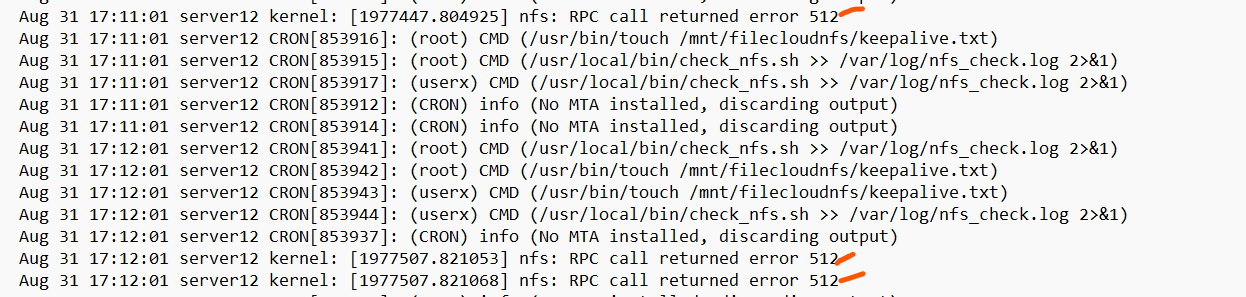
There seems to be intermittent connection between NAS server and the ubuntu server we are seeing the below errors from the OS logs due to this the NFS is disconnecting which in result FileCloud was always required to configure the storage path.
Kindly check if there is proper network connectivity.