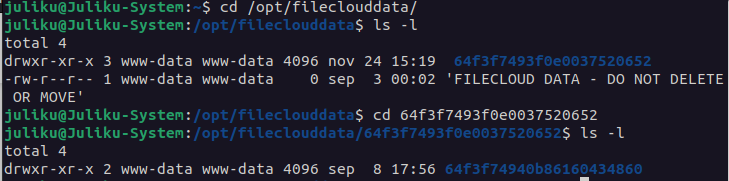
Hi, I’m having problems with my storage. The path of the storage is “/opt/fileclouddata” where I have a folder name according to the path that I get using the command:
In the /64f3f74940b86160434860 folder I have a volume of 400 GB where I save all my files.
Recently I had an issue not related to filecloud with my computer, after solving that issue I could not upload any file to the cloud and the admin portal when I use the check path says:
Storage system already initialized, however file containers are missing!
The “Storage system already initialized, however file containers are missing!” means that the data is in the database but missing the physical files that originally were in “/opt/fileclouddata”. It is essential that the entirety of the data gets restored to the original path prior to the issue with your computer.
Once all files are restored, this should that should fix the issue.
Hi @lorencelumapas
The problem is that I have the cloud working and one day just stopped working. I have not delete any files that originally were in “/opt/fileclouddata”.
I don’t know which files are missing or how to restore them.
Can you please provide more details as to what happened to your computer? As you mentioned, there was a problem. Were there any changes in the hardware was the “/opt/fileclouddata” directory moved at some point?
Hi @lorencelumapas
The problem was that I run out of space in the disk that has the OS. But I delete files from my Download folder. I don’t know if maybe some files in /opt/fileclouddata were damaged in some way. Is there a way of seeing if I have all the files that are necessary for filecloud to work correctly?
I saw that I have a File name “FILECLOUD DATA - DO NOT DELETE OR MOVE”, is a text file and is empty.
The “FILECLOUD DATA - DO NOT DELETE OR MOVE” file is primarily empty. You may run our scan tool to identify which files are missing. You may follow the steps in this document to run the scan tool.
The results should tell you which database entries are missing the physical files.
Hi @lorencelumapas
I run the scan tool and it does not seem to be any file missing, maybe i’m not seeing the error. Can I upload you the report somewhere so you could see if you see any errors?
You may upload the results here. It would also be helpful if you could include the server logs that you can find in /var/www/html/scratch/logs/log_YYYY-MM-DD.txt.
Can you please confirm that the highlighted path above does exist? The directory does not exist, you may have to restore your files from your backup.
In addition to running the report, it may be worth running the repair command below: php scan.php -h default -f True
Also, I would suggest to run a File System Check (fsck command) on your system to identify any file system sector issues.
Hi @lorencelumapas
Before the error the folder was named “64f3f74940b86160434860” and it was working, maybe something change in the mongodb and the name change. I created the folder with the “650d01453a1e5161418197” name now.
Running the command php scan.php -h default -f True did not repair it, I still can’t upload files.
Is there a way of uninstalling filecloud and installing it again? It may be quicker this way.
I can upload new logs if you need them.
I need you to confirm that the directory mentioned above does exist. Please do not manually rename or create a folder in the managed storage directory.
Please run an ls -l on the contents of /opt/fileclouddata/ and /opt/fileclouddata/64f3f7493f0e0037520652 and post the results here.
Will you be able to run a File System Check?
Uninstalling and Reinstalling FileCloud will not help.
Hi @lorencelumapas
It did not exist. I was not able to run fsck because I have to unmount the disk and this disk is where the OS is installed. It says that running the command with the disk mounted could cause damage to the disk.
Hi @lorencelumapas
I have a backup of my data (photos, documents, etc) in my computer, so that’s not a problem. I do not have the backup of the folder that you mention is missing, although I have it in the folder of “fileclouddata” so I do not understand why is not recognized.
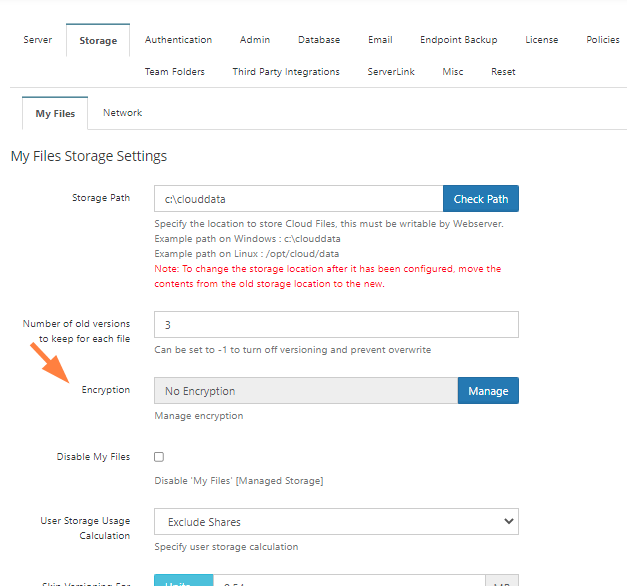
It’s not visible the option to use encryption, so I guess is not enabled, but the main problem that I need to solve is to being able to use again Filecloud.
I am referring to the backup of your Managed Storage, the entire folder structure under “/opt/fileclouddata”. That directory contains all your physical data imported into FileCloud.
You are getting that error because you are missing files/folders from your Managed Storage, and the only way to recover it is to restore the folders from the backup.