Problem with filecloud sync & mobile

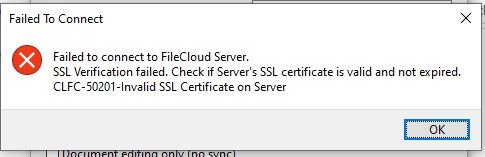
Hi. I installed Filecloud succesfully to my server with SSL and setting to my domain + created certificate etc… Now web-based Filecloud workin great with browser (https://mydomain.xx), but with Filecloud Sync i get error.
Filecloud_ssl_error

Any tips what will cause that ? Certificate looks ok from browser and https working great.
Thanks for the help.

@MorfeuZ

Please check if you have installed CA certificate with your SSL certificate, as it is essential for all the Filecloud apps.

You need to make sure that “SSLCertificateChainFile” is not commented out in the Apache SSL config. You can find more details in below documentations.

https://www.getfilecloud.com/supportdocs/display/cloud/Manually+Install+SSL+Certificates+for+FileCloud+on+Windows

https://www.getfilecloud.com/supportdocs/display/cloud/Install+an+SSL+certificate+on+Ubuntu

1 Like

Thank you for help. That make a trick. I installed sertificate again with windows “Install SSL Certificate” with SSL Intermediate Certificate (optional) called ca_bundle.crt. Now Filesync works with desktop and mobile. :partying_face:

1 Like

hi,
I try to follow the instructions for Ubuntu and when I write the command: “sudo cp server.crt $etcssl”
on directory: /etc/apache2 I got an error: “cp: cannot stat ‘server.crt’: No such file or directory”
can you help me understand why?
thanks
Hi @adam,

Could you please provide us the complete screenshot of the step at which you are getting error message.

You can upload the screenshot here FileCloud

I got the problem I didn’t create the certificate properly

1 Like