It says that the mongodb service is running. I am using windows 10. I was previously running the trial version of filecloud and it worked perfectly. Now when I try to run the CE version, it says system exception: cannot start service mongodb. Then when I click OK, it says failed to start mongodb running as a service. Check dB and log paths are absolute. Again when I click on make service it says service is running.
Hi @dwatson, as you mentioned that it was previously running the FC Server trial version. Did you uninstall the Filecloud services previously? like deleting the old xampp folder and delete the services?
If yes, please provide us the mongodb.log from this path: C:\xampp\mongodb\bin\log
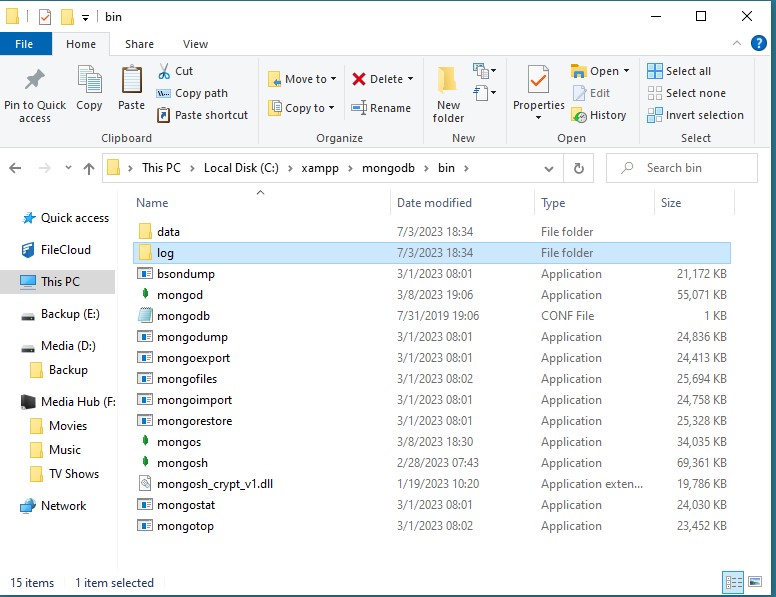
Also, provide us with the screenshot of this folder location (file explorer): C:\xampp\mongodb\bin
Here is the screenshot of the bin folder. There was no log file in the logs folder.
I did a complete uninstall and removal of the trial version. I also tried to rn this on a different pc and it worked ok.
@dwatson can you please upload the mongod.conf file on the shared link below:
password: l3visatx
I get an invalid share error
Invalid Share CLFC-00139
Would you like to screenshare my PC
https://zerg.codelathe.com/url/i2dpgzvbs2nsdfir
password: l3visatx
I just attached the file
In your mongodb.conf file, kindly update the dbpath and log path, same as below:
Where to store the data.
dbpath=C:\xampp\mongodb\bin\data
#where to log
logpath=C:\xampp\mongodb\bin\log\mongodb.log
After, try to start the mongodb service again.
1 Like
That works. I will save this file just i case I need to reload it. Was there an error somewhere that caused this?