Hi,
I have installed filecloud server under Ubuntu 22.04.3 LTS and installed using apt-get install filecloud, as in documentation.
Every tests pass excelpt Module rewrite that shows as failed in the Extended Checks page.
However, the module is installed (a2enmod rewrite => “Module rewrite already enabled”
Any possible reasons? Do I need to change any configuration after filecloud install?
Thanks,
Pedro
Hi @pmfreire
Kindly confirm are you experiencing any issues while trying to login to admin portal if yes let us know the error message you are getting
Hi,
yes, I can’t login.
Doesn’t show any error, just keeps waiting for login forever
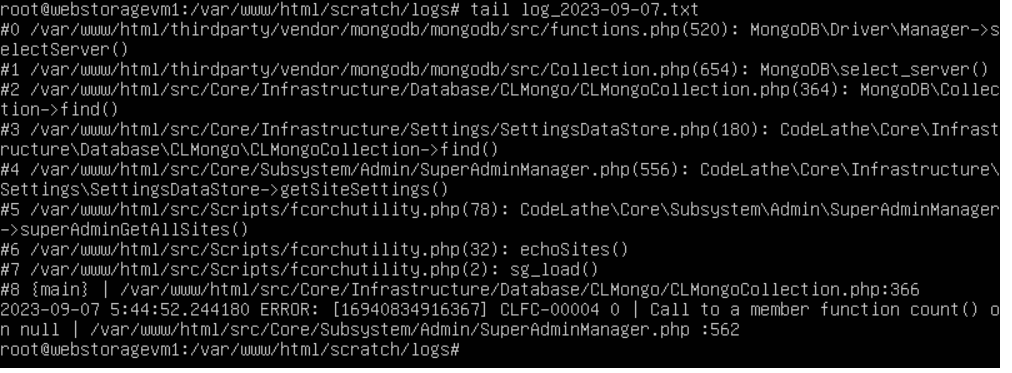
Sorry, indeed there was a scratch/logs error:
I then found another topic here where @VinceBlack suggested change “define(“TONIDOCLOUD_SECURE_COOKIE”, 1);” to zero and that solved the problem.
I must say I am accessing through http and not https.
Should the final config must be kept with secure_cookie as zero or is this a workaround that needs fixing?
Many thanks
Hi
Open the configuration file cloudconfig.php which will under the following path:
Windows Drive letter:\xampp\htdocs\config\cloudconfig.php
Linux /var/www/html/config/cloudconfig.php
Check for the following line:
define(“TONIDOCLOUD_SECURE_COOKIE”, 1);
Please change the value to 0 and save the file.
Then give a try to login. If you find any difficulty, kindly let us know.
Happy to help
Hi @Dakshini ,
the tweak of setting secure_cookie to 0 worked for the login issue and I now am able to login.
However, still getting Module rewrite failing extended checks 
Hi
Glad to know that you were able to login.
The module rewrite fail error is the false error notification we kindly suggest you to ignore them. Try to check if all the services are running successfully and also try to restart your device and check again. This is just a false warning which will not cause any issues and not related to any service since it is already enabled and login can be done without any issue
Happy to help
@Dakshini I have the same issue, although I didn’t have problems with the login at all.
I’m trying to get to FileCloud up and running, but can’t seem to fix the “Mod Rewrite Apache Configuration Setup Check”. When I go to change the Server URL it fails. I assume that has to do with the Rewrite error, yes?
Here’s a video showing the current setup/details for the error along with my .htaccess.
When I go my logs (in scratch) I find this:
2023-09-10 23:11:00.359136 ERROR: [16943802603347] HTTP FAILURE : RESOURCE_NOT_FOUND 404 http://172.104.XXX.XXX/.reverse-proxy/status?upstream_host=148.251.XX.XX&op=%2F.reverse-proxy%2Fstatus
I tried accessing the site from the Linode IP I’m running from. and this works as well. And the IP/install address checks are all green, but can’t login via the IP though. So there seems to be a problem with a reverse-proxy? Still don’t know how to solve that.
Do you have any idea what the problem it related to and how to fix it? I’ve dug around in the documentation, but can’t seem to find how to fix it.
I’m on the most current version of FileCloud along with Ubuntu v22.04.3 LTS.
(I managed to fix the small "Secure cookie setting (TONIDOCLOUD_SECURE_COOKIE) is used with HTTPS protocol" issue since, but not the rewrite issue  )
I also get “Server URL is invalid.” when checking URL.
Although I am accessing via the same URL.
Hi I am also having a similar issue in regards to mod_rewrite, I’ve changed the AllowOverride to All but I have a missing .htaccess file and I can’t find anything useful.
Hi @happy.frog2971
May we know what is the error you are receiving when trying to login and can you let us know what error are you getting when you login using FileCloud ip, kindly share us screenshots.
Hi @pmfreire
If you receive server URL invalid when setting URL then it means you have not installed SSL certificates including chain/intermediate certificate.
For more details you can refer to the below document on installing and configuring SSL.