Sorry if this was answered before but I was not able to find any related threads before posting.
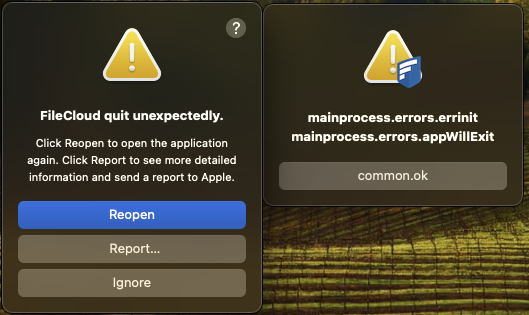
I recently switched to another Mac using the Migration Assistant and after this FileCloud Desktop stopped working. What happened was I was starting it and then it was crashing.
Now, I tried reinstalling using the latest prebuilt binary yet to no success, installation gives a final failure and while the app seems to be present in Applications afterwards, it has the same crashing behaviour.
The initial problem seems to have miraculously resolved itself one day, I have no better reproduction steps or insights.
However, the desktop application is still not working reliably for me, for the past couple of days it’s been stuck, not showing all files / folders on the server and not allowing me to try to logout - login. It just hangs once I try to do anything with it.
Looking over the Apple Console logs, I can see a couple of errors now, related to auth credential decryption.
error	10:23:20.835613+0200	FileCloud	getSettings: Error decrypting setting code2Fa: The operation couldn’t be completed. (CryptoKit.CryptoKitError error 3.)
error	10:23:20.835777+0200	FileCloud	getSettings: Error decrypting setting password: The operation couldn’t be completed. (CryptoKit.CryptoKitError error 3.)
error	10:23:30.849885+0200	FileCloud Desktop	WARNING: Secure coding is automatically enabled for restorable state! However, not on all supported macOS versions of this application. Opt-in to secure coding explicitly by implementing NSApplicationDelegate.applicationSupportsSecureRestorableState:.
error	10:23:30.911412+0200	FileCloud	getSettings: Error decrypting setting cookies: The operation couldn’t be completed. (CryptoKit.CryptoKitError error 3.)
error	10:23:30.911642+0200	FileCloud	getSettings: Error decrypting setting code2Fa: The operation couldn’t be completed. (CryptoKit.CryptoKitError error 3.)
error	10:23:30.925695+0200	FileCloud	getSettings: Error decrypting setting cookies: The operation couldn’t be completed. (CryptoKit.CryptoKitError error 3.)
error	10:23:30.925782+0200	FileCloud	getSettings: Error decrypting setting password: The operation couldn’t be completed. (CryptoKit.CryptoKitError error 3.)
error	10:23:30.926000+0200	FileCloud	getSettings: Error decrypting setting code2Fa: The operation couldn’t be completed. (CryptoKit.CryptoKitError error 3.)
error	10:23:30.940545+0200	FileCloud	Starting RMC heartbeat failed: The data couldn’t be read because it isn’t in the correct format.
Can you also gather the FileCloud Desktop logs?
You can find them at /Users/USERNAME/Library/Group Containers/NY2B63T68P.com.filecloud.macDrive where USERNAME will be the user’s username.