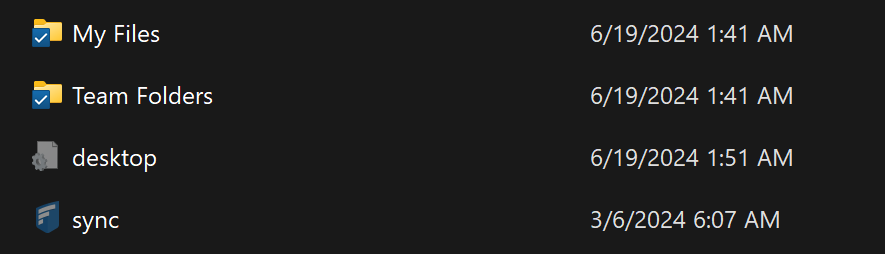
I am currently using a self-hosted filecloud server. I also have a domain associated with it which is SSL configured. Everything works perfectly fine when I use the website and mobile sync app. However, the desktop sync app does not work. I can login but when syncing it never sync neither the file from my desktop or to my desktop. I am pretty much sure the path is setup correctly as it shows the tick mark on the main My Files and Team Folders. But the internal folders or files never syncs.
1 Like
Hello Kalel,
Please note the tick mark is used with FileCloud Drive not Sync, could you confirm which application are you using ? Maybe you have both installed on your client machine.
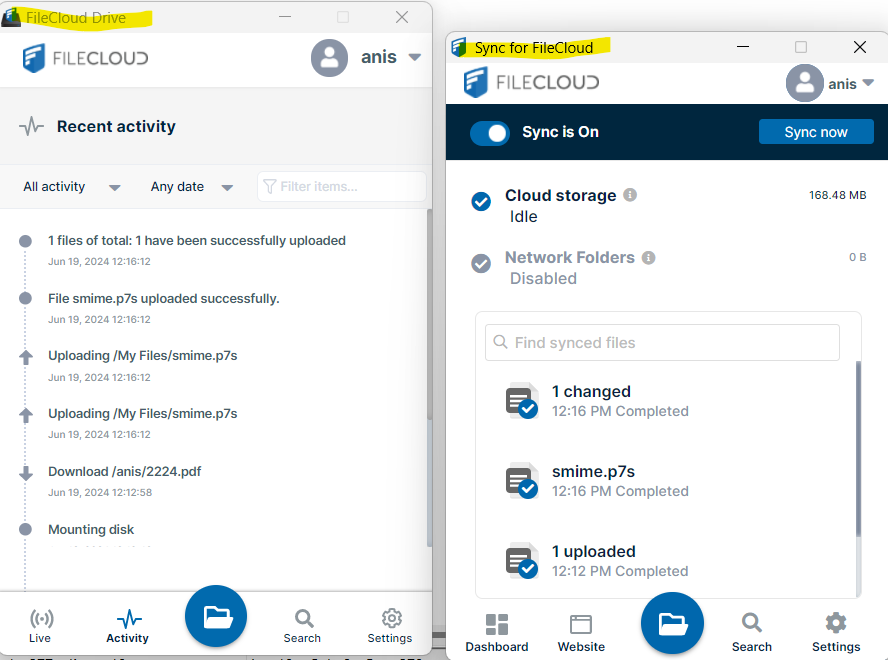
Please capture a full screenshot of your FileCloud application so we can advice further.
Best Regards
I only have FileCloud sync installed,
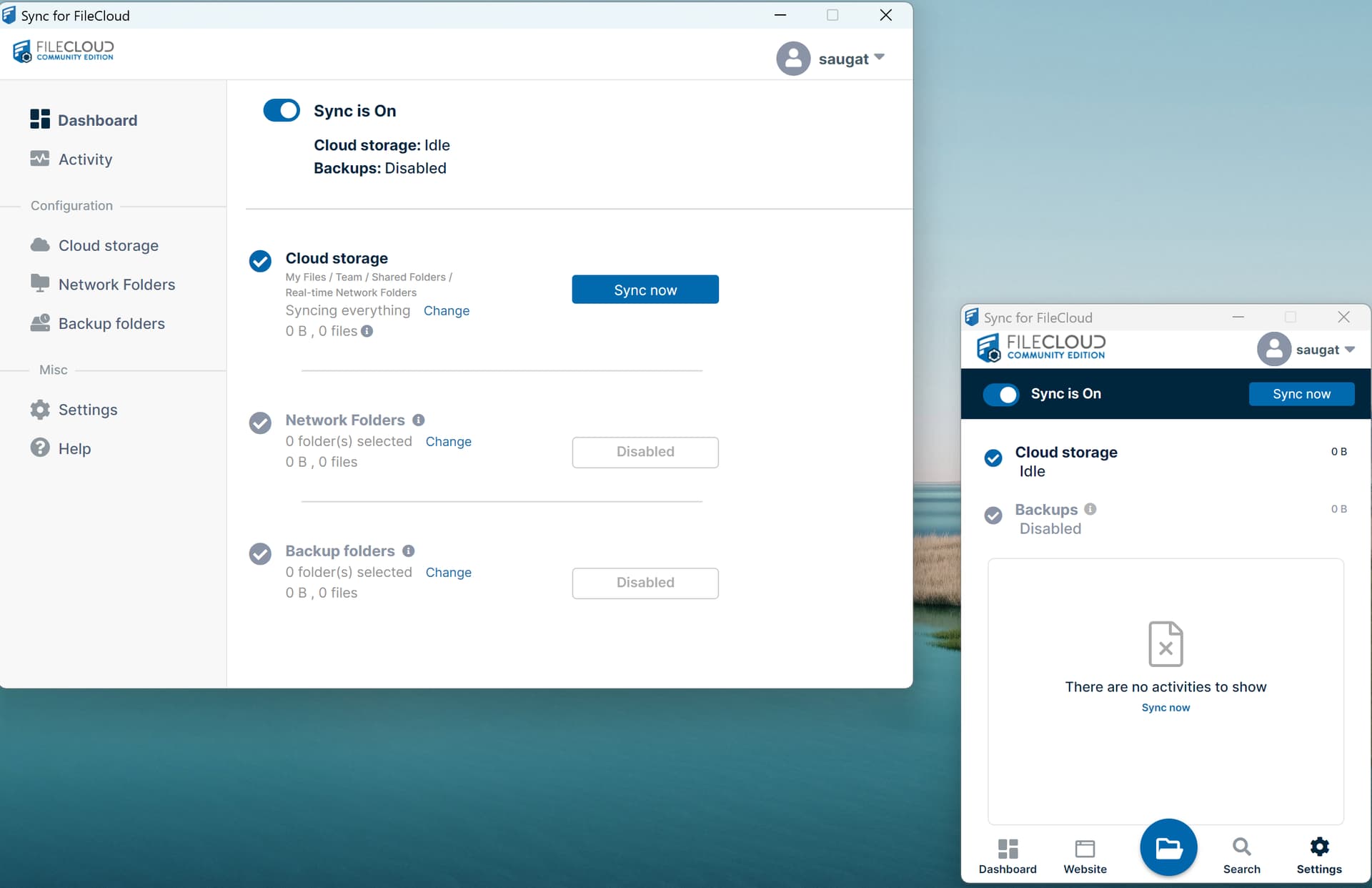
. In the cloud storage it basically say 0 files 0 bytes but I have files on the server.
Hello Kalel,
Thank you for your feedback and comments.
Please proceed as below to troubleshoot the issue:
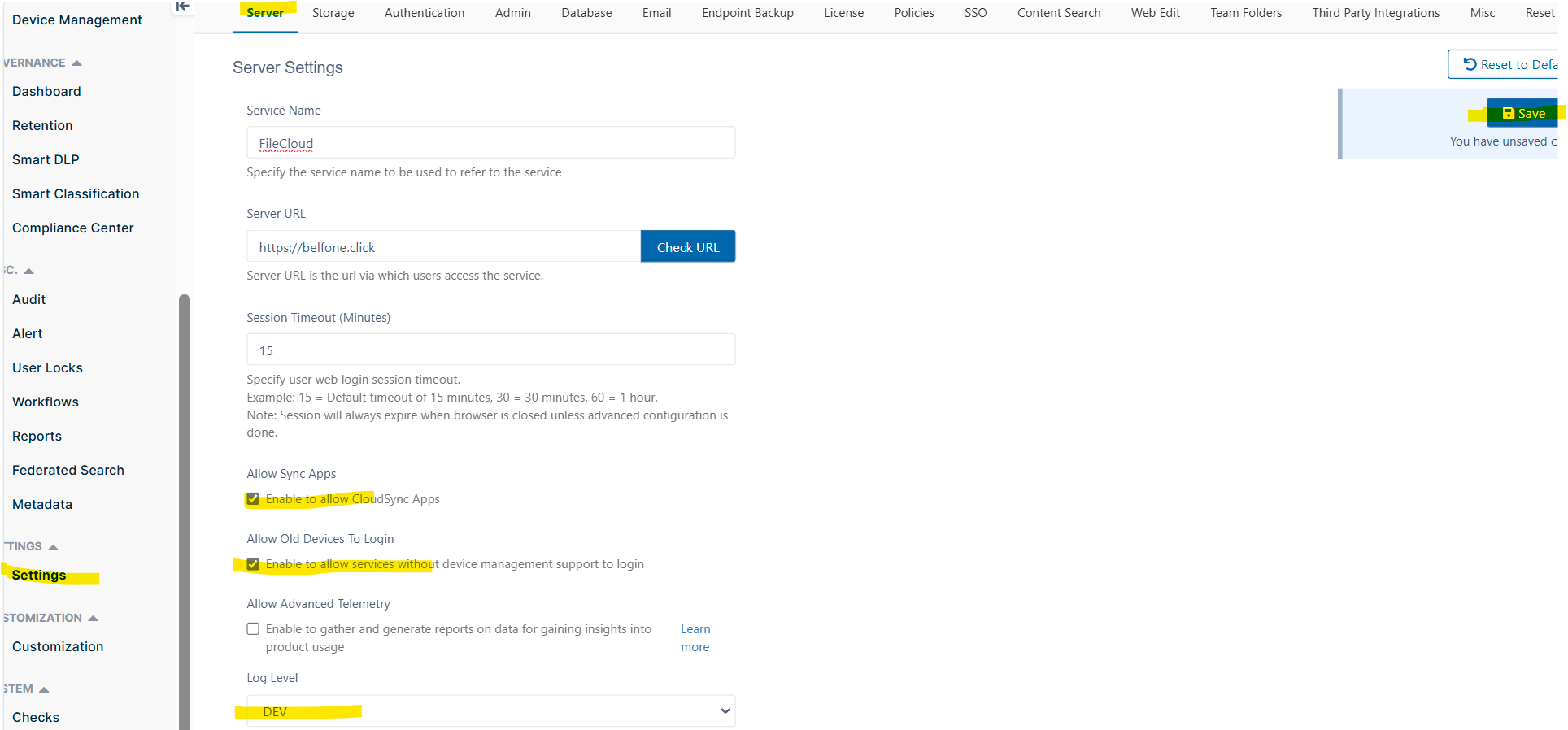
- Set FileCloud server logs to DEV from Admin Portal > Settings > Server > Log Level and Save.
- Open Sync client on the Windows client machine and click on “Open Sync folder” then access the My Files folder and past a file over there.
- Wait for few minutes then collect the below items:
- Screenshot of FileCloud Sync Activity tab from Sync menu > Settings > Activity
- Get Sync client log and configuration files from the Windows client machine:
%APPDATA%\FileCloudSyncData\client\syncclient.log
%APPDATA%\FileCloudSyncData\client\fcesc.log
%APPDATA%\FileCloudSync\syncclientconfig.xml
- Get FileCloud Server logs from Admin Portal > Checks > Generate Logs
Please share the files over the below link:
password: rc5hemle
Best Regards
Thank you for your quick response. I followed your process and have attached those documents with this. The act
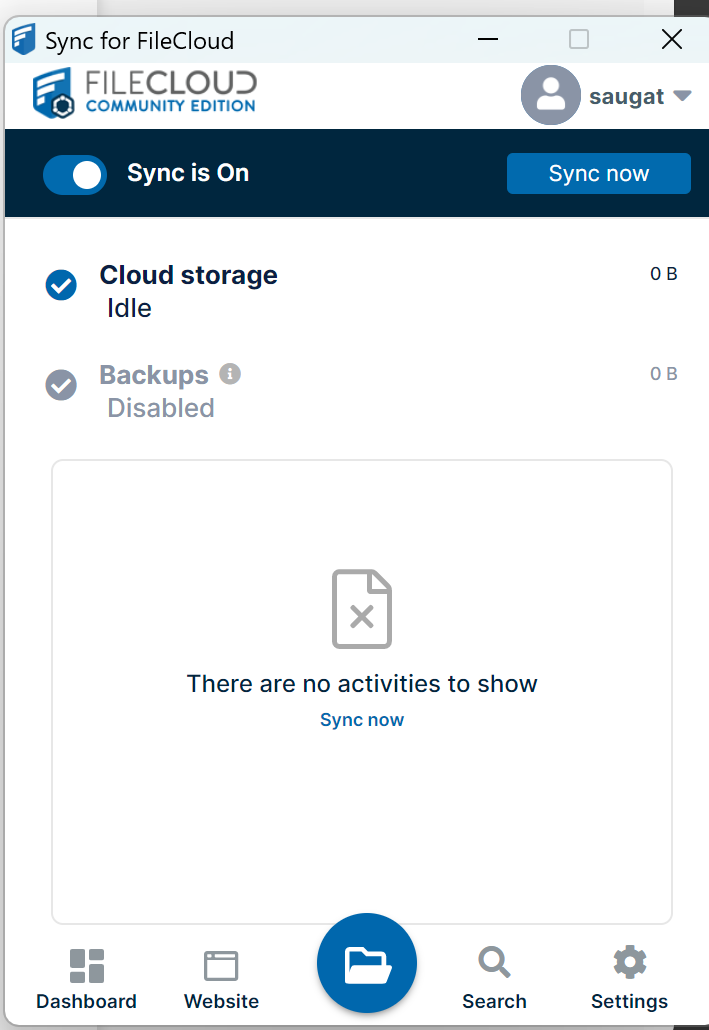
ivity screen basically does not show anything on it.
Sync Client Logs - 06-21-24 23:53:25:082 [25] :T: RMC Payload: Available Disk Space:333.70 GBBackup Folders:Backup:0 B, 0 filesBandwidth Limits (Alternative)No Rate Limits SetBandwidth Limits (Global)No Rate Limits SetDocIQ Lock On Edit:DisabledDocIQ:EnabledMac Address:68:7a:64:e8:d4:5fOffline Folders:Offline:0 B, 0 filesRealtime:0 B, 0 filesRemote Management:EnabledSelected Folders:Sync:EnabledTime Active Controls:Disabledattr:Statusattr:accountloggedin1attr:disablemyfilesDisabled
06-21-24 23:53:25:083 [25] :T: -------------------------------------------
06-21-24 23:53:26:417 [25] :T: Ignoring RMC APPLY CONFIG since it does not contain commands for cloudsync. Please verify the same
06-21-24 23:53:55:232 [22] :D: – SYNC STATUS: SS080
06-21-24 23:53:55:240 [22] :D: – SYNC STATUS: SS090
06-21-24 23:53:55:241 [22] :T: >>>> STEP 1. Getting List of Folders to Sync from Server
06-21-24 23:53:55:243 [22] :D: Req : /app/sync/getsyncfolderlist?v=1&friendly=SAUGATHOME
06-21-24 23:54:06:944 [22] :T: Check SyncStatus: /saugat : server,0; is missing in local and is NOT UP TO DATE. SKIP DETECT: 0 TEAM FOLDER: 0 TEAM FOLDER ACCT: homeshare
06-21-24 23:54:06:954 [22] :T: Check SyncStatus: /SHARED/homeshare/Documents Share : server,0; is missing in local and is NOT UP TO DATE. SKIP DETECT: 0 TEAM FOLDER: 1 TEAM FOLDER ACCT: homeshare
06-21-24 23:54:06:956 [22] :D: – SYNC STATUS: SS100
06-21-24 23:54:06:957 [22] :T: >>>> STEP 2. Getting Sync Delta Changes for /saugat
06-21-24 23:54:06:958 [22] :T: Tonido::Sync::FSWorker::doGetSyncDeltaGetSyncDelta: /app/sync/getsyncdelta?friendly=SAUGATHOME&name=3ddc5196-305a-11ef-8471-687a64e8d45f&path=%2Fsaugat Status:
06-21-24 23:54:07:608 [22] :T: Tonido::Sync::FSWorker::doGetSyncDelta : Got Sync Delta ; Time taken : 0.650238 seconds
06-21-24 23:54:07:617 [22] :D: FS Need to Process : 0 changes from server
06-21-24 23:54:07:618 [22] :D: – After Initial Sync: /saugat Local Status: server,0; RemoteSyncStatus: server,0;
06-21-24 23:54:07:619 [22] :D: – SYNC STATUS: SS100
06-21-24 23:54:07:619 [22] :T: >>>> STEP 2. Getting Sync Delta Changes for /SHARED/homeshare/Documents Share
06-21-24 23:54:07:620 [22] :T: Tonido::Sync::FSWorker::doGetSyncDeltaGetSyncDelta: /app/sync/getsyncdelta?friendly=SAUGATHOME&name=3ddc5196-305a-11ef-8471-687a64e8d45f&path=%2FSHARED%2Fhomeshare%2FDocuments%20Share Status:
06-21-24 23:54:08:228 [22] :T: Tonido::Sync::FSWorker::doGetSyncDelta : Got Sync Delta ; Time taken : 0.608929 seconds
06-21-24 23:54:08:231 [22] :D: FS Need to Process : 0 changes from server
06-21-24 23:54:08:232 [22] :D: – After Initial Sync: /SHARED/homeshare/Documents Share Local Status: server,0; RemoteSyncStatus: server,0;
06-21-24 23:54:08:232 [22] :D: – SYNC STATUS: SS040
06-21-24 23:54:08:233 [22] :D: – SYNC STATUS: SS040
06-21-24 23:55:58:400 [22] :D: – SYNC STATUS: SS080
06-21-24 23:55:58:410 [22] :D: – SYNC STATUS: SS090
06-21-24 23:55:58:411 [22] :T: >>>> STEP 1. Getting List of Folders to Sync from Server
06-21-24 23:55:58:412 [22] :D: Req : /app/sync/getsyncfolderlist?v=1&friendly=SAUGATHOME
06-21-24 23:56:09:828 [22] :T: Check SyncStatus: /saugat : server,0; is missing in local and is NOT UP TO DATE. SKIP DETECT: 0 TEAM FOLDER: 0 TEAM FOLDER ACCT: homeshare
06-21-24 23:56:09:837 [22] :T: Check SyncStatus: /SHARED/homeshare/Documents Share : server,0; is missing in local and is NOT UP TO DATE. SKIP DETECT: 0 TEAM FOLDER: 1 TEAM FOLDER ACCT: homeshare
06-21-24 23:56:09:839 [22] :D: – SYNC STATUS: SS100
06-21-24 23:56:09:839 [22] :T: >>>> STEP 2. Getting Sync Delta Changes for /saugat
06-21-24 23:56:09:840 [22] :T: Tonido::Sync::FSWorker::doGetSyncDeltaGetSyncDelta: /app/sync/getsyncdelta?friendly=SAUGATHOME&name=3ddc5196-305a-11ef-8471-687a64e8d45f&path=%2Fsaugat Status:
06-21-24 23:56:10:462 [22] :T: Tonido::Sync::FSWorker::doGetSyncDelta : Got Sync Delta ; Time taken : 0.622581 seconds
06-21-24 23:56:10:471 [22] :D: FS Need to Process : 0 changes from server
06-21-24 23:56:10:472 [22] :D: – After Initial Sync: /saugat Local Status: server,0; RemoteSyncStatus: server,0;
06-21-24 23:56:10:473 [22] :D: – SYNC STATUS: SS100
06-21-24 23:56:10:474 [22] :T: >>>> STEP 2. Getting Sync Delta Changes for /SHARED/homeshare/Documents Share
06-21-24 23:56:10:474 [22] :T: Tonido::Sync::FSWorker::doGetSyncDeltaGetSyncDelta: /app/sync/getsyncdelta?friendly=SAUGATHOME&name=3ddc5196-305a-11ef-8471-687a64e8d45f&path=%2FSHARED%2Fhomeshare%2FDocuments%20Share Status:
06-21-24 23:56:11:109 [22] :T: Tonido::Sync::FSWorker::doGetSyncDelta : Got Sync Delta ; Time taken : 0.635164 seconds
06-21-24 23:56:11:117 [22] :D: FS Need to Process : 0 changes from server
06-21-24 23:56:11:119 [22] :D: – After Initial Sync: /SHARED/homeshare/Documents Share Local Status: server,0; RemoteSyncStatus: server,0;
06-21-24 23:56:11:120 [22] :D: – SYNC STATUS: SS040
06-21-24 23:56:11:120 [22] :D: – SYNC STATUS: SS04*0
fcesc logs - 2024-06-21 23:48:23.575 INFO CALLBACK: FC_GET_FOLDER_NAMES_RECORD_OK
2024-06-21 23:48:23.575 INFO Folder names saved: {“teamfoldername”:“Team Folders”,“teamfolderaccount”:“homeshare”,“networkfoldername”:“Network Folders”}
2024-06-21 23:48:24.687 INFO minidashhandled1
2024-06-21 23:48:24.687 INFO Mini Dashboard open succssfully sent to service
2024-06-21 23:48:25.938 INFO CALLBACK: FC_GET_CONFIG_AFTER_MOUNT_READY_OK
2024-06-21 23:48:25.938 INFO Config Data saved…
2024-06-21 23:48:25.938 INFO Passing config values to UI…
2024-06-21 23:48:25.939 INFO FC_UIController::showMiniDashboard requested…
2024-06-21 23:48:25.939 INFO Language is set as: en
2024-06-21 23:48:25.939 INFO Language is set as: en
2024-06-21 23:48:25.939 INFO Intializing the mini dash window
2024-06-21 23:48:25.939 INFO No timeout
2024-06-21 23:48:25.939 ERROR Could not read the certificate path while validating.
2024-06-21 23:48:25.939 INFO verifyCertificates()
2024-06-21 23:48:25.939 INFO FFO ready status:
2024-06-21 23:48:25.939 INFO FFO Server is not ready. Not starting FFO.
2024-06-21 23:48:25.948 INFO Adding tray…
2024-06-21 23:48:25.956 INFO Initializing Tray options…
2024-06-21 23:48:25.957 INFO Tray already added
2024-06-21 23:48:25.957 INFO Initializing Tray options…
2024-06-21 23:50:24.410 INFO minidashhandled1
2024-06-21 23:50:24.411 INFO Mini Dashboard open succssfully sent to service
2024-06-21 23:50:24.419 INFO minidashhandled1
2024-06-21 23:50:24.419 INFO Mini Dashboard open succssfully sent to service
2024-06-21 23:51:50.501 INFO minidashhandled1
2024-06-21 23:51:50.501 INFO Mini Dashboard open succssfully sent to service
2024-06-21 23:51:50.505 INFO minidashhandled1
2024-06-21 23:51:50.505 INFO Mini Dashboard open succssfully sent to service
2024-06-21 23:51:57.170 INFO minidashhandled1
2024-06-21 23:51:57.170 INFO Mini Dashboard open succssfully sent to service
2024-06-21 23:51:57.175 INFO minidashhandled1
2024-06-21 23:51:57.175 INFO Mini Dashboard open succssfully sent to service
syncclientconfig
"<?xml version="1.0" encoding="UTF-8" ?>
allowcentralmgmt
bool
1
allowedfilelist
string
My Files|Team Folders
disablenotifications
bool
0
httpproxyhost
string
httpproxypassword
string
httpproxyport
string
httpproxyuser
string
language
string
english
officehelperdisabled
bool
0
officehelperlockonedit
bool
1
showlocks
bool
0
syncclientlocation
string
DEFAULT
syncfolderlocation
string
C:\Users\saugat\FileCloudDrive\FileCloud
syncfrequency
int
120
usewhiteprogressicon
bool
0
“”
Hello Kalel,
Please could you upload previously requested FileCloud Sync and Server files to the share link in my previous message:
%APPDATA%\FileCloudSyncData\client\syncclient.log
%APPDATA%\FileCloudSyncData\client\fcesc.log
%APPDATA%\FileCloudSync\syncclientconfig.xml
FileCloud Server logs (in DEV Log Level) from Admin Portal > Checks > Generate Logs
Please gather and upload above logs after trying to upload a file via FileCloud Sync and by directly uploading using FileCloud User Interface from a web browser.
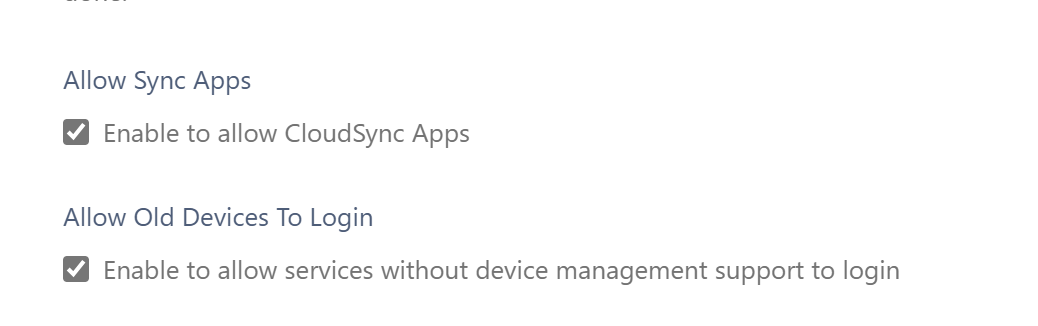
Finally please verify that you have the “Allow Sync Apps” options below enabled in FileCloud Admin Portal > Settings > Server:
Best Regards