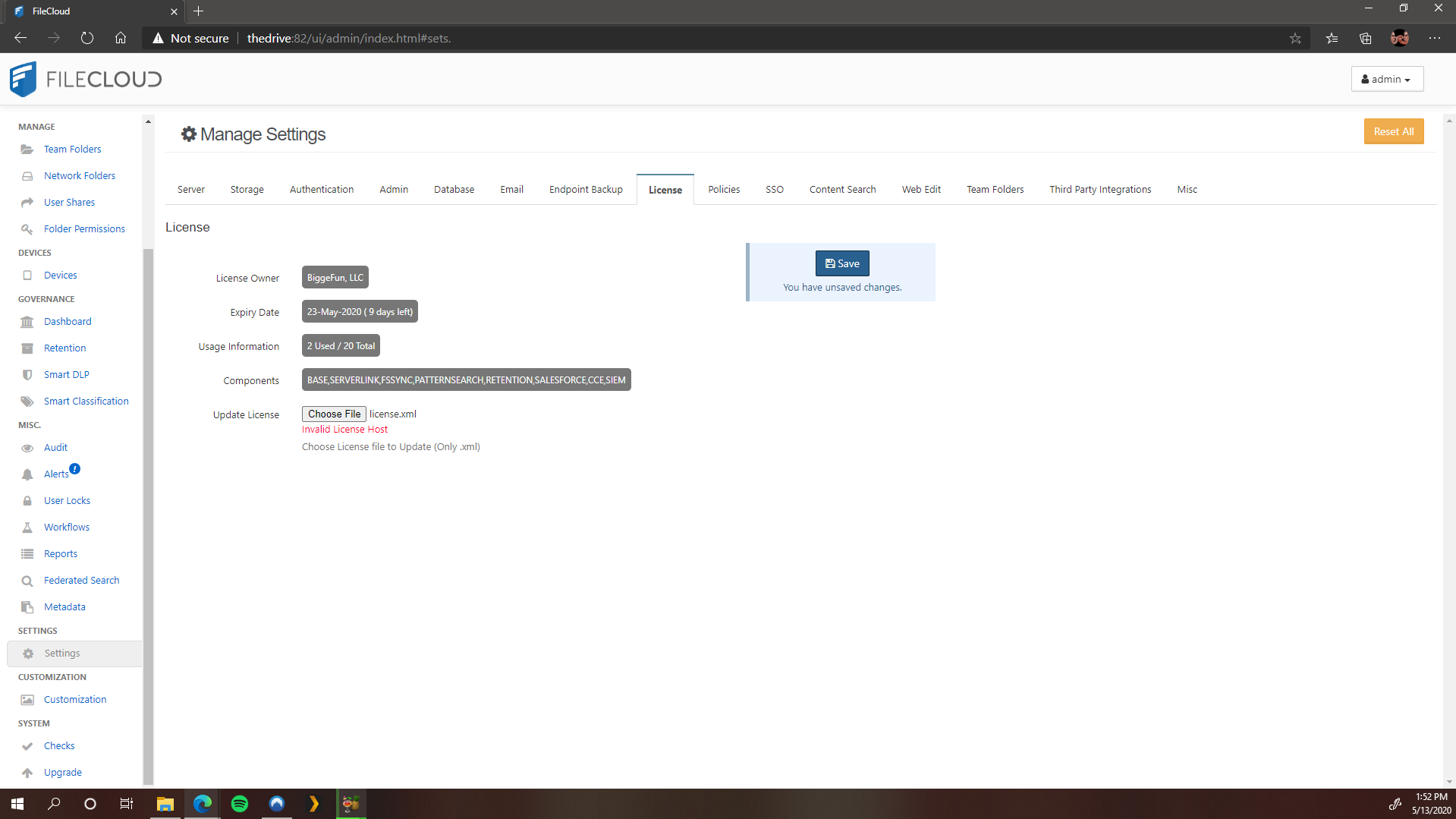
Hello Filecloud Community! I recently had purchased a community edition license for the deployment url filecloud.biggefun.net. I had recently just finished my trial license on my Docker installation, and by the time that I wanted to install my new license, it always returns with red text saying “invalid license host”. I’m relatively new to working with servers and am teaching myself as I go along. I have Filecloud running on port 82 and 446 and am trying to run it through a reverse-proxy with my letsencrypt ssl cert on nginx and using godaddy for my dns. I’ve been wracking my brain about this error for a few days to no avail and don’t know if it’s related to me not having nginx or my dns records properly set, and it says the url is valid when I check it in the admin settings. I’m also only able to access it from local or public ip, not with the url. If anyone could help out it would be much appreciated!
Here is my nginx.conf file:
    map $http_upgrade $connection_upgrade {
        default upgrade;
        ''      close;
    }

    upstream docker-filecloud {
        server     172.17.0.1:446;
    }

server {
    listen      80 ;
    listen [::]:80 ;
    server_name biggefun.net thedrive.biggefun.net www.biggefun.net filecloud.biggefun.net;

    #for certbot challenges (renewal process)
    location ~ /.well-known/acme-challenge {
        allow all;
        root /data/letsencrypt;
    }
    #rewrite url from https:// to https://
    return 301 https://$host$request_uri;
}

server {
    listen 443 ssl http2;
    listen [::]:443 ssl http2;
    server_name biggefun.net thedrive.biggefun.net www.biggefun.net filecloud.biggefun.net;

    #ssl cert locations
    ssl_certificate /etc/letsencrypt/live/biggefun.net/fullchain.pem;
    ssl_certificate_key /etc/letsencrypt/live/biggefun.net/privkey.pem;
    ssl_dhparam /etc/ssl/certs/dhparam-2048.pem;

    ssl_protocols TLSv1.2 TLSv1.3;
    ssl_prefer_server_ciphers off;

    ssl_ciphers ECDHE-ECDSA-AES128-GCM-SHA256:ECDHE-RSA-AES128-GCM-SHA256:ECDHE-ECDSA-AES256-GCM-SHA384:ECDHE-RSA-AES256-GCM-SHA384:ECDHE-ECDSA-CHACHA20-POLY1305:ECDHE-RSA-CHACHA20-POLY1305:DHE-RSA-AES128-GCM-SHA256:DHE-RSA-AES256-GCM-SHA384;
    ssl_buffer_size 8k;
    server_tokens off;
    ssl_ecdh_curve secp384r1;
    ssl_session_tickets off;

    # OCSP stapling
    ssl_stapling on;
    ssl_stapling_verify on;
    resolver 8.8.8.8 8.8.4.4;

    location / {
        #security headers
        add_header Strict-Transport-Security "max-age=31536000; includeSubDomains; preload";
        add_header X-XSS-Protection "1; mode=block" always;
        add_header X-Content-Type-Options "nosniff" always;
        add_header X-Frame-Options "DENY" always;
        #CSP
        add_header Content-Security-Policy "frame-src 'self'; default-src 'self'; script-src 'self' 'unsafe-inline' https://maxcdn.bootstrapcdn.com https://ajax.googleapis.com; img-src 'self'; style-src 'self' https://maxcdn.bootstrapcdn.com; font-src 'self' data: https://maxcdn.bootstrapcdn.com; form-action 'self'; upgrade-insecure-requests;" always;
        add_header Referrer-Policy "strict-origin-when-cross-origin" always;
    }

    include /etc/nginx/sites-available/*.conf;
    root /usr/share/nginx/html;
    index index.html;
}
And for my filecloud.conf that loads from sites-available:
location / {
    proxy_set_header        Host $host;
    proxy_set_header        X-Real-IP $remote_addr;
    proxy_set_header        X-Forwarded-For $proxy_add_x_forwarded_for;
    proxy_set_header        X-Forwarded-Proto $scheme;
    # Fix the .It appears that your reverse proxy set up is broken" error.
    proxy_pass          https://docker-filecloud/;
    proxy_buffering     off;
    chunked_transfer_encoding on;
    client_max_body_size 100M;
    proxy_read_timeout  90;
}