Hello. I recently set up filecloud to work with my domain. I am no expert but at first, I believe it had worked but it seems like it hasn’t. Every time I attempt to log in to the admin panel or user account from any browser either nothing happens or I log in momentarily and get kicked back to the login screen. Any type of suggestion or help would be greatly appreciated.
Hi @Bill617
Could you please confirm the URL or ip address you are trying to login can you try login using 127.0.0.1/admin in FileCloud server and confirm whether you are able to login.
Hello. I am able to log in from 127.0.0.1/admin and I set up a new URL in the settings but it still does the same thing. Sometimes I click the login button and it does nothing.
Hi @Bill617
Could you please try to select the checkbox to disable the IP check as shown in below screenshot by login to admin portal navigating to settings >> misc >> general and save the settings then try to login again.
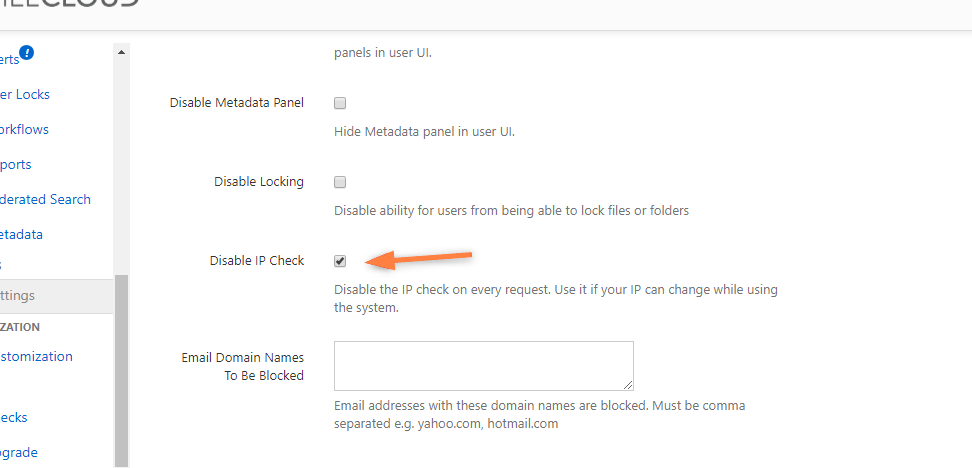
Seems to have worked! Are there any security risks regarding disabling IP checks?
Update: The website no longer resolves. I get a 502 error. I restarted it but still get the same error.
Hi @Bill617
Did you clear cache and cookies and tried accessing website?
Have you check whether Apache web service status, can you please send us screenshot of the command systemctl status apache2.service ?
If service is not active did you try to restart and access the website ?
Could you please send us access and error logs in case the above steps doesn’t work from the path
/var/log/apache2/ on the below link ?
Everything seems to be working. On the AWS console my instance doesn’t pass a check for reachability from the browser. I am not sure what it is but I am going to look into it and keep you updated. Thank you again.