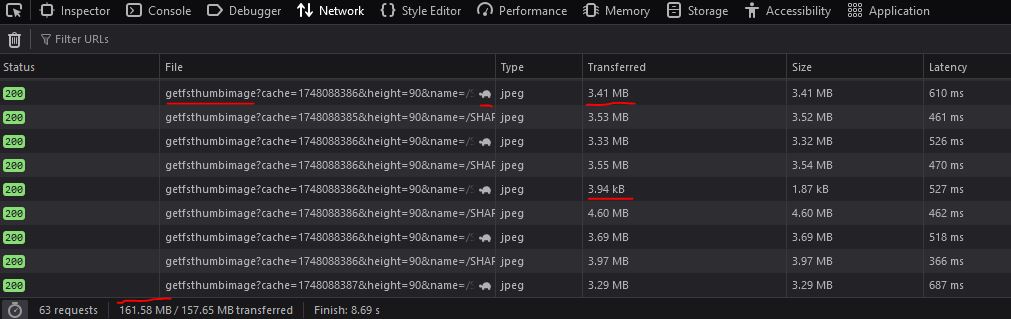
The size of thumbnails of images is huge and any folder with a few images in it takes almost forever to load:
- This was opening a folder with 50 JPEGs in it. It cannot be that simply opening the folder will transfer 161MB.
- Used layout: List
- It seems that some pictures do not have this problem. Bug? For example:
-
- Picture in landscape format, original size 7.79MB, thumb size, 3.94KB
-
- Picture in portrait format, original size 7.94MB, thumb size, 4.6MB
Environment:
- Red Hat VM, fully patched
- FC Community Version: 23.242.0.29412
- Hardware under the hood: M.2 SSD
Hello @JohnSmith
Thank you for contacting the FileCloud Support Team.
Could you try overriding the Thumb File size limit to a max of your preferred value?
- Open cloudconfig.php:
Windows Location: XAMPP DIRECTORY/htdocs/config/cloudconfig.php
Linux Location: /var/www/config/cloudconfig.php
- Add the following:
define('TONIDOCLOUD_DOCUMENT_THUMB_SIZE_MB', 10);
- Change 10 to the custom size limit in MB.
More information can be seen from our documentation.
Overriding Thumb and Preview Size Limits - FileCloud Docs - Server.
Hi John
Thank you for getting back to me. Without changing anything I am not able to reproduce the issue. It’s gone! The thumbnails are about 5KB which is perfect.
I did try to add the code you wrote before posting here and it did not help, so I removed it again (the path is also a bit different, it was in /var/www/html/config/cloudconfig.php).
However, what I did is I updated to the latest version 23.251.0.30079 - maybe this fixed it.