hi,
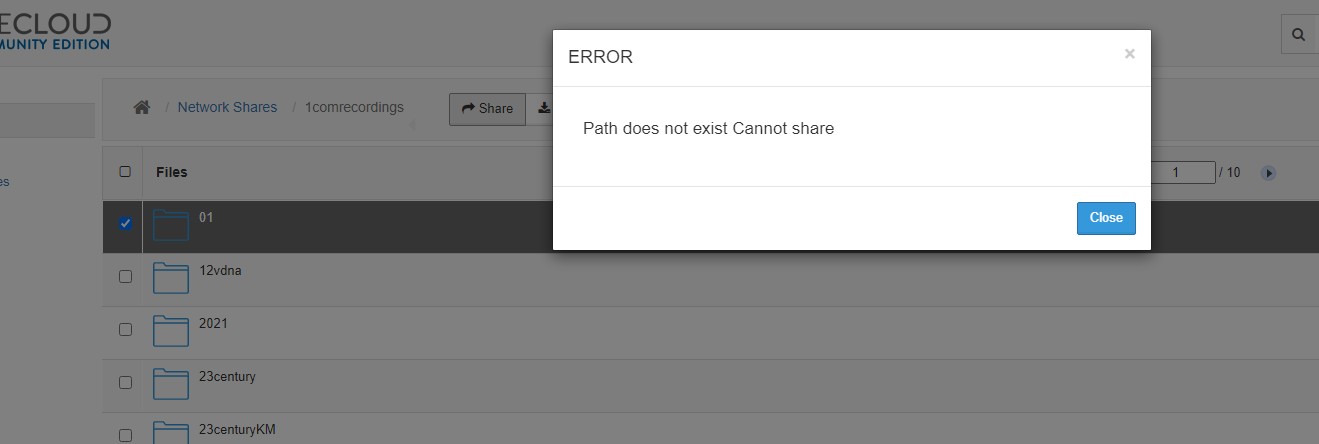
when I try to share a folder in a network share, I get this error
“Path does not exist Cannot share”
my network share is a bucket in wasabi.
what I missed?
thanks in advance
Hello @Ophir
To further troubleshoot the issue, we will require the FileCloud server logs.
Please reproduce the error again with server logs in debug mode.
To enable debug mode, open the Admin Portal, go to Settings->Log Level, and set it to “DEV.”
Then please replicate the issue and send us the logs.
Please download the logs in FileCloud Admin Portal → SYSTEM → Checks → Generate Logs.
Please upload the screenshot of the error and the logs to the below share link.
uploaded
the zip file ok?
Hello @Ophir
We have checked the logs. It shows that the system can not correctly access the bucket or path from the wasabi storage.
Logs:
2022-02-10 18:00:37.623064 DEBUG: [16445088364162] Translated Path: /EXTERNAL/1comrecordings/01 after: xxxx/01
2022-02-10 18:00:37.623369 DEBUG: [16445088364162] getFileAccess : Path = /EXTERNAL/1comrecordings/01 Owner=support1com doCheck=1
2022-02-10 18:00:37.659395 DEBUG: [16445088364335] log : LOGGING AUDIT getcommentsforitem
2022-02-10 18:00:37.661625 DEBUG: [16445088364198] CodeLathe\Core\Subsystem\External\ExternalS3FolderImpl:fileExists:1comrec/01
2022-02-10 18:00:37.661855 DEBUG: [16445088364198] CodeLathe\Core\Subsystem\External\ExternalS3FolderImpl:makeS3Connection : End point=https://xxxx.wasabisys.com
2022-02-10 18:00:37.678290 DEBUG: [16445088364162] CodeLathe\Core\Subsystem\External\ExternalS3FolderImpl:fileExists:1comrec/01
2022-02-10 18:00:37.678509 DEBUG: [16445088364162] CodeLathe\Core\Subsystem\External\ExternalS3FolderImpl:makeS3Connection : End point=https://xxxx.wasabisys.com
2022-02-10 18:00:37.685385 DEBUG: [16445088364198] fileExists : CHECKING FOR PATH 01
2022-02-10 18:00:37.696156 DEBUG: [16445088364162] fileExists : CHECKING FOR PATH 01
2022-02-10 18:00:37.738980 DEBUG: [16445088364198] fileExists : PATH not found 01
2022-02-10 18:00:37.740570 DEBUG: [16445088364162] fileExists : PATH not found 01
2022-02-10 18:00:37.740683 DEBUG: [16445088364162] fileExists : CHECKING FOR PATH  01/
2022-02-10 18:00:37.741959 DEBUG: [16445088364198] fileExists : CHECKING FOR PATH  01/
Please check whether the credentials you used for setting up the network share have proper access to the basket and its files.
thanks for checking the logs.
I used a wasabi user credentials with a wasabi full access policy.
and the user I created to make the shares can see all the folders, subfolders, download etc.
the only problem found is this PATH issue.
I dont think its a wasabi issue because I am testing other software that sharing works just fine.
Hello @Ophir
Please update us with the latest database dump from the location " /var/www/html/scratch/autobackups/ ".
Please use the share link we provided earlier for uploading the data.
uploaded the last dump
Hello @Ophir
Our Development Team has gone through the database dump and could not locate any FileCloud settings issues.
Please let us know whether you are still facing this issue? If yes, please check whether you can reach the endpoint URL from the FileCloud server.
yes, the issue is still there.
reach the end point url from filecloud server? what your meaning?
I see the bucket and folders and files, I can download… everything ok except share.
Hello @Ophir
Thank you for your time and patience with this.
We have done a detailed check on the reported issue with the help of our Development Team. It looks like your wasabi user doesn’t have the permission to run the operation called " HeadObject. "
Error executing "HeadObject" on "https://s3.eu-west-1.wasabisys.com/XXX/XXX/2017"; AWS HTTP error: Client error: `HEAD https://s3.eu-west-1.wasabisys.com/XXX/XXX/2017` resulted in a `404 Not Found` response NotFound (client): 404 Not Found (Request-ID: BB56CEE9AB555F1A) -
This permission is needed for checking the objects in S3.
Please assign this permission to your wasabi user and recheck the issue from the FileCloud user portal again.
Thank you, I couldn’t wait for your solution, so I moved to other software that succeed with all the sharing with no problem. And with nothing to change in permission.
So I won’t be able to confirm if this solution would solve my issue or not.