Hey there, my server has been working just fine until now, but I tried to set up SMB sharing on my ubuntu machine which runs my filecloud server and then tried to access my filecloud storage path via SMB share (i know, stupid, but my upload times have been crazy slow so i wanted to see if i could drop stuff straight into the folder locally.) Now everytime i try to upload a file, it acts as if the file is fully uploading and then at the end i get the notification “Error saving file!”. I set the storage drive permissions all back to what they need to be, and i didn’t really change anything else when configuring Samba, so i’m kind of at a loss for what is causing the issue.
Hi
Could you please provide a short snippet or screenshot of the error you are seeing from your end?
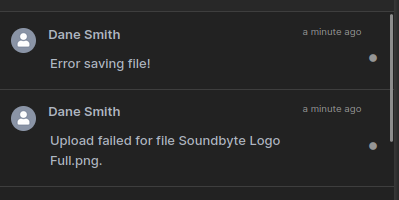
This is the notifications I recieve every time I try to upload a file, no matter if it’s to my team folder or the “my files” folder
Hi
To further troubleshoot the issue we will require the FileCloud server logs. Please reproduce the error again with server logs in debug mode. To enable debug mode, open the Admin Portal, go to Settings->Log Level, and set it to “DEV”. Then please replicate the issue and send us the logs. Please download the logs in FileCloud Admin Portal → SYSTEM → Checks → Generate Logs
Manual log collection
You can find the FileCloud logs from here
Windows: drive letter:\xampp\htdocs\scratch\logs\log_YYYY-MM-DD.txt
Linux: /var/www/scratch/logs/log_YYYY-MM-DD.txt (in Ubuntu 14.04 and later
          /var/www/html/scratch/logs/log_YYYY_MM_DD.txt)
you can upload the details here FileCloud
Okay I’ve uploaded my logs to that link, after reproducing the issue. Let me know what you can discern from those.
UPDATE RESOLVED
Just wanted to update in case anyone runs into a similar issue, I wasn’t able to find a solution through these forms but ended up stumbling upon a fix myself. I simply followed the steps on this page for resetting my storage drive: Reset FileCloud - FileCloud Docs - Server
And then reconfigured my storage path and everything worked smoothly. Keep in mind you will basically have to reconfigure all settings and re-post all data after doing this so if your server is super specifically set up or already hosts a ton of data/shares this may not work for you. In my case my setup was relatively new and i had nothing of importance on my server which made this easy to do.
1 Like
Hi
Glad to know that it has been resolved and thank you for the update.
If you find any difficulty kindly reach out to us we are here to help you out
Have a happy day!
Thanks Dakshini,
Would you be able to remove the link you posted for me to upload the logs? I believe they are publicly viewable right now
Hi
My pleasure. I have successfully removed the share link
Thank you