I´m wanting to know how to restore the files saved on a second hdd, file cloud when the storage is set to that same location is ingoring the existing data and making a sperate folder, is there anyway I can still recover these files with me having no access to the original file cloud to create the mongodb backup
Hello @joel0v3sgames ,
To be able to assist further, can you clarify ‘files saved on a second hdd’?
The original c:\ drive is corrpted and I can not launch windows nor filecloud to create the mongoDB backup, however in file cloud you can specify a save location, this was set as d:\ drive, so all of my personal files which were uploaded to filecloud are safe, or at least the data is, when setting up the new filecloud with windows reset i specified the new location to be the same folder, however as expected filecloud is not pickup up any of the data thats already there and just ignoring it be it through the created account with the same details or filecloud admin saying no data is currently stored.
Are the files saved on the second HDD an exact copy of the Managed Storage files in your original FileCloud instance? Recovering data in FileCloud requires a dump of your MongoDB database and an updated copy of your managed storage. Below is a screenshot of your managed storage from the Admin Portal.
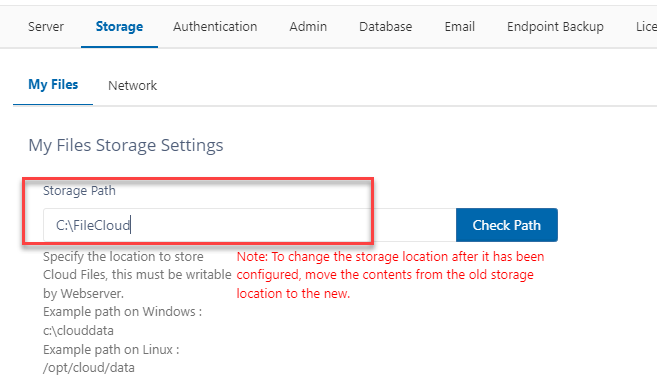
If you are utilizing Network Folders in Filecloud, you should be able to remap those network locations back into FileCloud to give users access to the data.
Apart from that, you would have to start from scratch by reuploading your data in the new server.