Dear all,
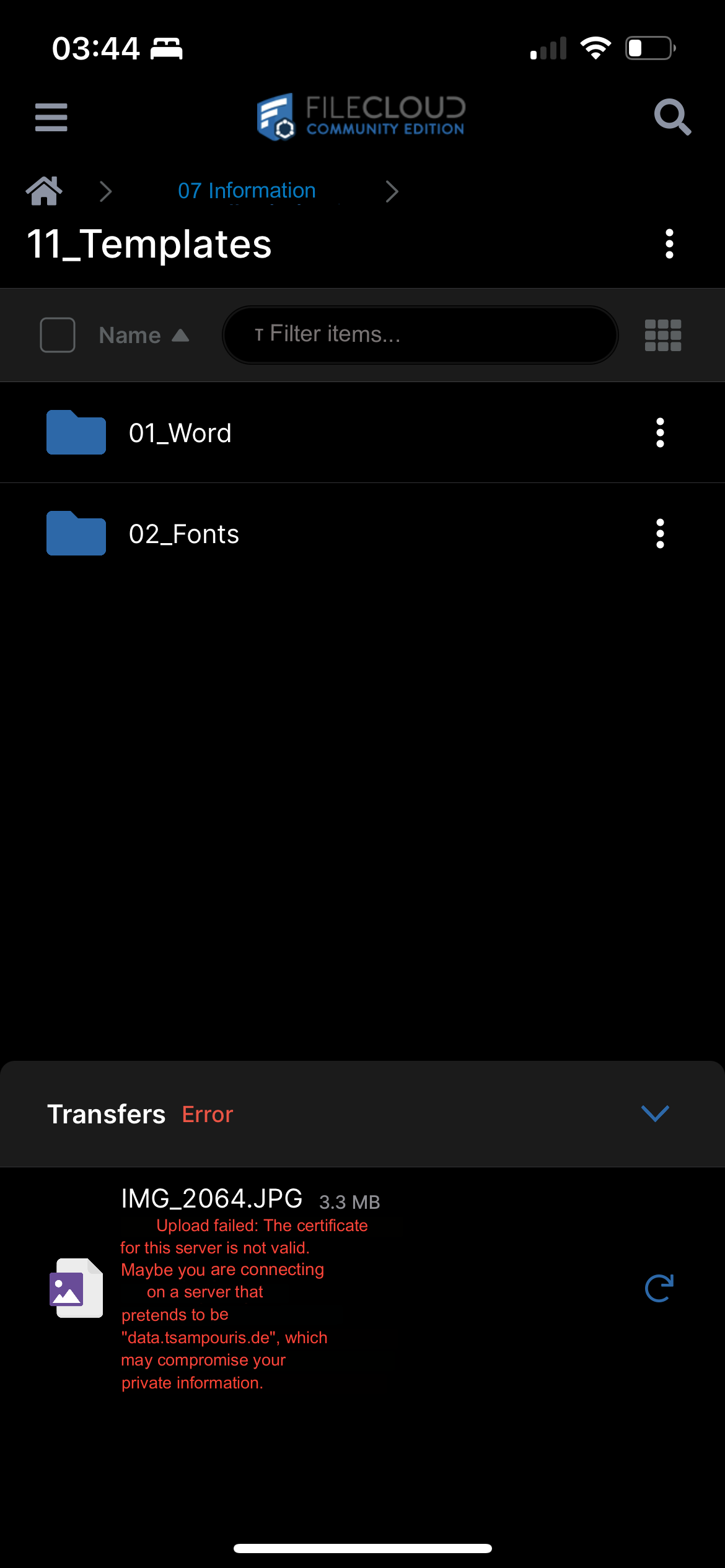
when trying to upload a file to the server via the iPhone app, I am getting a certificate error and the upload does not proceed.
I can though upload the same files through different iPhone apps, by “sharing” those files to Filecloud.
Could you advise any action in order to understand and solve this problem?
Hello @tsampouris.e
Please share the error screenshots of the issue and also share us app logs.
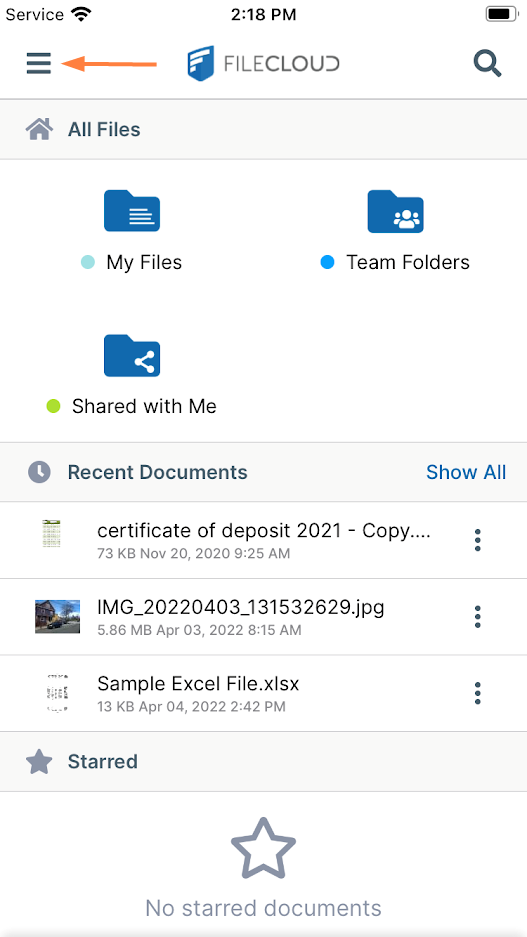
Log in to the app upload file again, and tap the menu icon in the upper left corner as shown below, then tap Offline files .
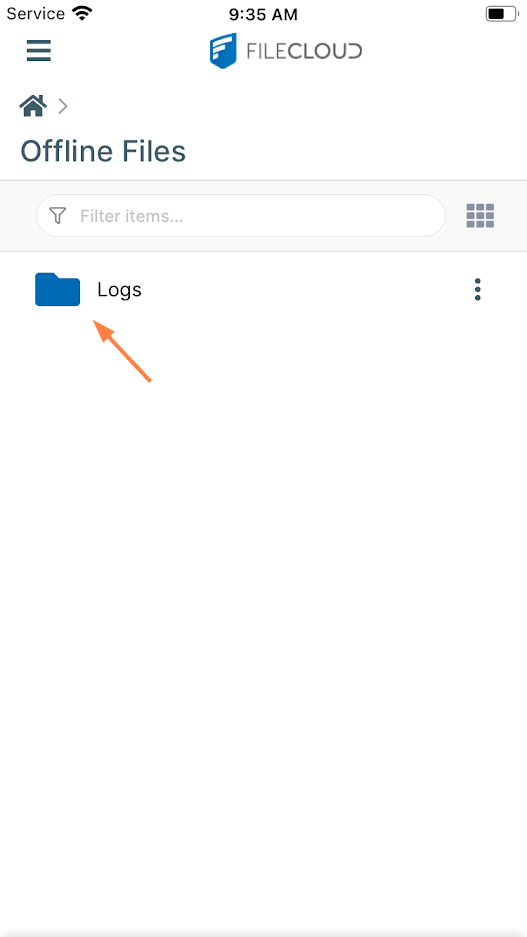
The Offline Files folder opens. Log files are stored in the Logs folder tap the folder to access the log files.
Pls see here .https://we.tl/t-PGiOLqe6eY
remark: i couldn’t download logs either from filecloud app to the phone so i had to copy texts manually. see resp screenshot in the filecloud app.
Hello @tsampouris.e
Thank you for the logs.
Are you able to upload the same files through web user portal ?
Hello!
do you mean the web user portal of my file cloud instance?
I tried this. The files do generally upload to the server via the web user portal.
Here a share of the files uploaded to my server for your information:
https://data.tsampouris.de:2082/url/wpypnuihieshc3t2
Hello @tsampouris.e
Is this issue only with image_2064 file or with all the files can you confirm?
The error appears with any file.
Same behaviour also on other iPhone
and on other user account simultaneously.
Functions cycled below in red
won’t work for different users and files.
https://data.tsampouris.de:2082/url/byjpcenyuxpj2bzn
Hello,
-
iPhone 13, iOS 16.3.1
-
There is no antivirus or similar installed
on this iPhone to block traffic or apply
https-Scans or similar.
-
A 2nd user on iPhone 6 experiences
exact same behaviour.
He has full read write access
on the network shares concerned.
General remark: the issue appeared
directly after updating Filecloud server
to its latest version.
It is possible that the Filecloud iPhone app
installed updates ad well without us directly
noticing.
No other change on the
iPhones or on the user settings before-after.
This puts focus on Filecloud for the
troubleshooting.
Hello,
I am running Filecloud Server
Version 23.1.0.22597.
On the iPhone App, under settings, I can see:
Filecloud 23.1.00 (1085.0).
I have tried to upload a photo via the mobile app with the same error.
Directly after I downloaded the app logs.
Pls. find them under the upload link shared.
Hello @tsampouris.e
May we know full path of the file location you are trying to upload it?
Hello,
…i was thinking also on it. Unfortunately, the same error occurs on different locations (paths).
F.i. when uploading a photo directly under “My Files” or on a network share with short or long file path, with Latin or other characters.
Just for example, tried to upload a file under:
Network Shares/98_Transfer-drive.
Same error.
Hi,
Upon checking, we could see that previously provided error message screenshot links seems to be expired. Could you kindly provide us all the following details?
-
Is it happening only through one iphone or happening under multiple iphone? If it is under only one iphone then what is the iphone version under which issue is appearing and which is the other iphone version on which it worked without any issue?
-
Please provide us the complete screenshot of the error message you are getting while trying to upload. You can upload the screenshot here FileCloud
-
Can you once try to uninstall and re install the app and give a try again to upload?
-
Is it only happening in mobile device or from web portal as well?
-
Kindly make sure to run the latest version of FileCloud.
Happy to help
Hello,
Most Qs are already answered. For the sake of simplicity, here below the answers:
-
Same behaviour on two iPhones (iPhone 13 and iPhone 6)
See details earlier in the thread.
-
uploaded
-
done, no result. Same behaviour before /after
-
error appears only on the iphone app.
Web client can be used to upload any file
without error.
-
latest Filecloud server version running.
Hi @tsampouris.e,
We are checking this issue with our internal team and get back to you as soon as we have an update.
Hi @tsampouris.e
Thank you for your time.
May we know your FileCloud URL and is it accessible through internet?
Sure. Below the URL.
It is accessible from the internet
(as far as you don’t sit behind a firewall blocking
the respective port).
https://data.tsampouris.de:2082
Hi @tsampouris.e
There is certification error, can you please let us know are you using any load balancer or proxy behind your FileCloud server ?